
⏱️ One-tap timer
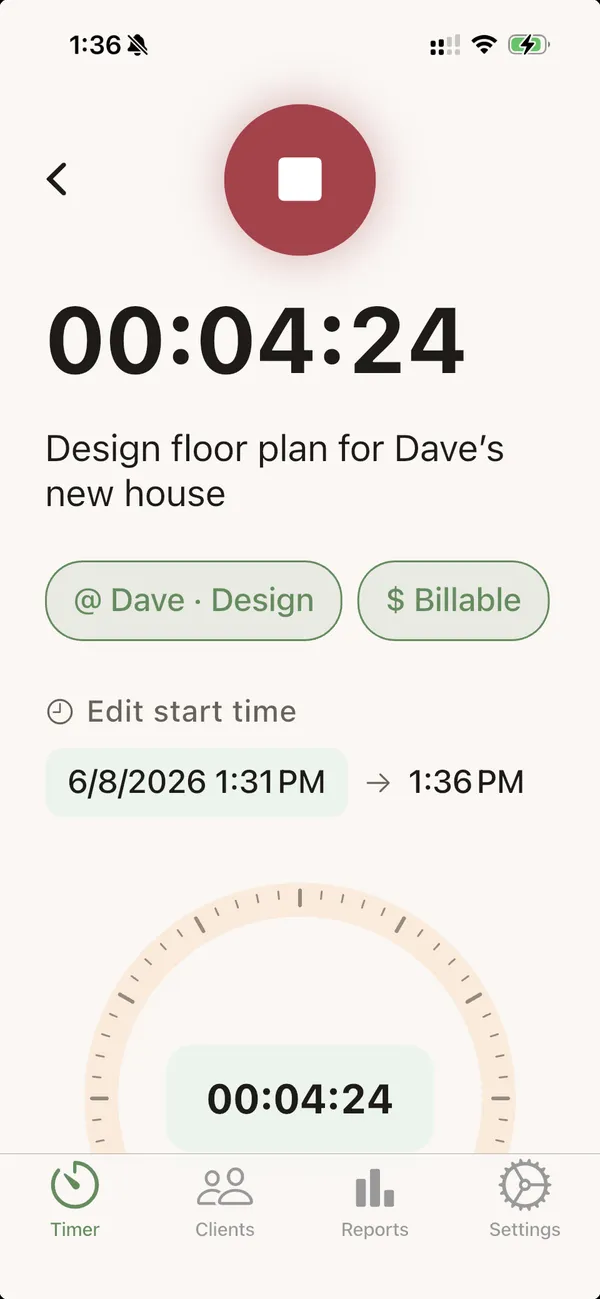
Start and stop in a single tap. A calm dial shows your day at a glance.
For people who bill by the hour
Tally is a calm, beautifully simple time tracker for lawyers, consultants, and freelancers. One tap to start. Add time you forgot. Turn your hours into clean invoices — without the busywork.
Free to start · iPhone, Mac & web · Your data stays yours
See it in action
Tap to start. Tap to stop. Every billable minute, captured — then turned into a clean, professional PDF invoice in seconds. Here's the whole thing in half a minute.
Track every minute. Bill every hour.
Get TallyFull walkthrough
A quick narrated tour: set up your branding and default rate, add clients and projects, track time with the timer, check your reports, and send a polished invoice. Tap play — sound on.
When you bill by the hour, the minutes you don't capture are money you never see. Most time trackers are clunky spreadsheets or bloated enterprise tools. Tally is the opposite: quiet, fast, and human — so logging your work feels like nothing at all, and getting paid for it feels effortless.
Tap once to start a timer for any client. Forgot to start it? Add a past time block in seconds and pick a quick duration — 30m, 1h, 1.5h — done.
Keep every entry tied to the right client, project, and rate. Mark what's billable, jot a note, and Tally keeps your day tidy automatically.
Turn your hours into a polished PDF invoice with your logo and send it to your client — straight from the app. Your numbers, finally working for you.
Start and stop in a single tap. A calm dial shows your day at a glance.
Missed a timer? Log past work on any day with quick-set durations — and merge split sessions into one clean entry when you're tidying up to invoice.
Per-client and per-project rates, so every entry bills at the right amount.
Generate branded PDF invoices and send them to clients without leaving the app.
iPhone, Mac, and web stay perfectly in sync — start on one, finish on another.
Your client work is yours. Secure sign-in and data scoped to your account alone.

A note from the founder
Hi, I'm Yufan — the maker of Tally. I kept watching friends who bill by the hour lose real money to the small stuff: a timer they forgot to start, a note they meant to write down, an invoice that took all evening. The tools meant to help felt like another job.
So I set out to build the time tracker I'd want to use every day — one that's warm instead of corporate, fast instead of fiddly, and respectful of the fact that your time is your living. Tally is small on purpose. It does the few things that matter, and it does them beautifully.
A little about me: I'm a UC San Diego grad, and when I'm not building Tally you'll usually find me out surfing or skateboarding, or off traveling somewhere new to see more of the world. I think the best tools are made by people who'd rather be living their life than fighting their software — so that's the kind of app I tried to make.
If you've ever undercharged because tracking was a pain, this one's for you. Welcome — I'm glad you're here.
— Yufan Chen, Founder
Connect with me on LinkedIn → Try Daily Log, another app I built →
Tally is for the people who'd rather be doing their craft than chasing their hours — the solo lawyer, the two-person practice, the freelancer building something of their own. You're not a cost center. You're someone whose time deserves to be counted. Let's make every hour count, together.
The math is simple
Tally is free — track your time, organize clients and projects, and preview your invoices at no cost. You start with 20 invoice points, and one point turns an invoice into a polished PDF. Catch a single hour you'd otherwise have forgotten to bill and Tally has already paid for itself many times over.
Free to use · 20 invoice points to start · 10 more for $4.99, or unlimited from $79.99/year
Stop leaving money on the tableTally is live on the App Store in 175 countries — install it free in under a minute. On iPhone & iPad, download from the App Store. On Android, scan to download the app directly. On Mac, download the app below.
🌍 The App Store button opens your country's store automatically — Tally is available in 175 countries. Sent to the wrong store? Choose your country →
📱 On the App Store for iPhone & iPad · also on Mac & web
 Scan to download on iPhone
 Scan or tap for Android
A simple time tracker for people who bill by the hour. Track time with one tap, organize it by client and project, and turn it into clean invoices.
Solo lawyers, small firms, consultants, and freelancers — anyone whose income depends on capturing billable hours accurately.
Open the Timer tab and tap the green play button to start. Add a project, mark it billable, and note what you're working on — then tap the red stop button to save. Tip: tap a recent project to start a timer already assigned to it.
Yes. Add a time block to any past day and pick a quick duration like 1.5 hours. Tally files it on the right day automatically.
If you tracked the same work in separate sessions, you can combine them into one — they just need to be on the same day, same project, and same billable status. Open the entry you want to keep, scroll to "Merge options", tick the entries to fold in (or turn on "Merge all today"), and confirm. The combined entry keeps the earliest start time, adds up the durations, and joins the notes together.
Tap any entry to open Edit Entry, change the project, start or end time, billable toggle, or notes — then tap Save.
Swipe left on the entry (or hover over it on the web) and tap the trash icon, then confirm. Deleted entries aren't gone for good — open Settings → Recently deleted to restore them for up to 15 days.
Open the Clients tab and tap "Add client", then enter a name (and optionally a rate, email, and address). To add a project, tap a client, tap "New project", give it a name and rate, and save.
Rates can be set at three levels, and the most specific one wins: an app default (Settings → Invoice settings), per client, or per project. For flat-fee work, edit the project, turn on "Fixed fee", and enter the amount.
From the Clients tab, long-press a client (or project) and tap "Send invoice", then choose Share PDF, Print, Send to your client, or Send to me. Want to review it first? Open Reports and tap a client's "Preview invoice". Your invoice numbers, due dates, and business details come from Settings → Invoice settings.
Yes — sign in to the same account (email, Google, or Apple) on each device and your entries, clients, projects, and settings stay in sync across iPhone, Mac, and the web app, automatically.
Export: open Export (Reports on mobile), pick a date range, and tap "Export as CSV". Import: in the web app, open Import, upload a CSV or spreadsheet, review the preview, and tap "Import".
Tally is free to use on every platform. Tracking time, clients, projects, expenses, reports and invoice previews cost nothing, with no trial and no time limit. The only metered action is turning an invoice into a finished PDF, which uses one invoice point. Every account starts with 20 points and gets 3 more free at the start of each month; points never expire. Need more: 10 for $4.99, 25 for $9.99, 60 for $19.99. Send a lot: unlimited invoices for $9.99/month or $79.99/year.
Points and subscriptions are bought in the Tally app on iPhone or iPad, through your App Store account. Your balance belongs to your Tally account, so points bought on your phone work on the web and on Mac too. Subscriptions can be cancelled anytime in your App Store settings; tap "Restore purchases" if you already paid on another device.
Tally is fully available in English and Traditional Chinese (繁體中文) — the entire app switches instantly. Choose your language in Settings → Language anytime.
Tally supports US dollars (USD) and New Taiwan dollars (NTD). Set your default in Settings → Invoice settings, and you can override the currency per client — handy if you bill some clients in NT$ and others in $.
Theme: Settings → Theme, then pick a preset — each has a light and dark variant that follows your device. Language: Settings → Language, then choose English or 繁體中文.
Your client work is scoped to your account with secure sign-in. It's your data — always.